EN FR NL
Car selling website & CMS

Complete CMS to sell your cars and follow your results.

WebCarSolutions.be gives you a full car dealer CMS: public website for your stock, admin panel to manage content, visitor statistics and invoicing with profit overview.

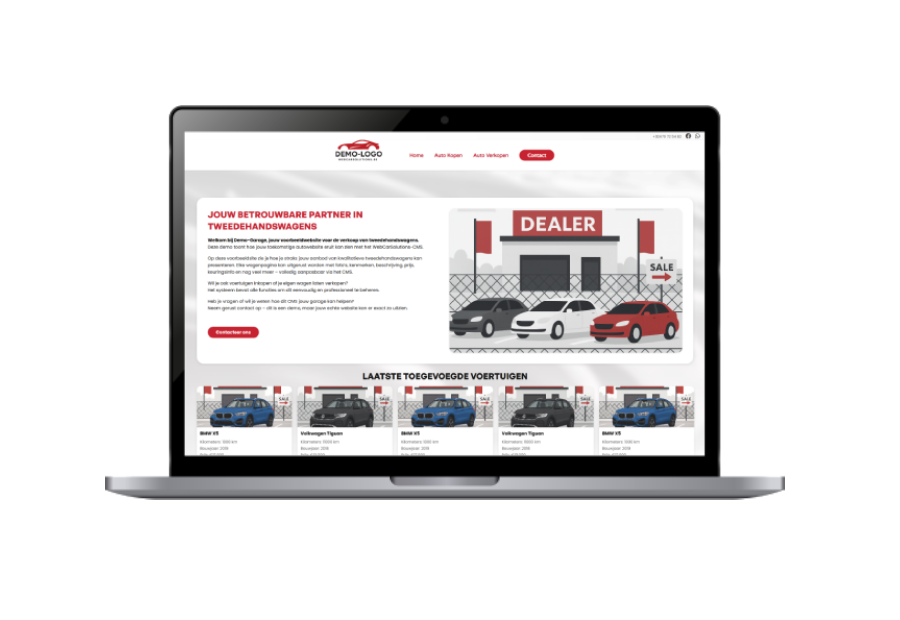
  • Modern public website like the demo for used cars.
  • Admin panel to manage cars, texts, logo, colours and opening hours.
  • Built‑in dashboard and invoicing with income / cost / profit view.
WebCarSolutions dashboard
Website · Invoicing · Analytics
Visitors today
24
Homepage / stock
Cars viewed
37
Detail pages
Invoices
6
This month
Visits Cars Invoices
Live overview

See who visits your site, which cars they view and which invoices you create – all from one CMS.

Website, CMS and invoicing made for car dealers.

WebCarSolutions is not only a website. It is a complete CMS for garages: public site for your cars, admin panel to manage content and vehicles, visitor statistics and an invoicing module with profit overview.

Public website
Modern car website for your stock

Show your used cars on a clean website like the demo: hero banner, last added cars, opening hours and map.

  • Homepage with intro text and hero banner for your garage.
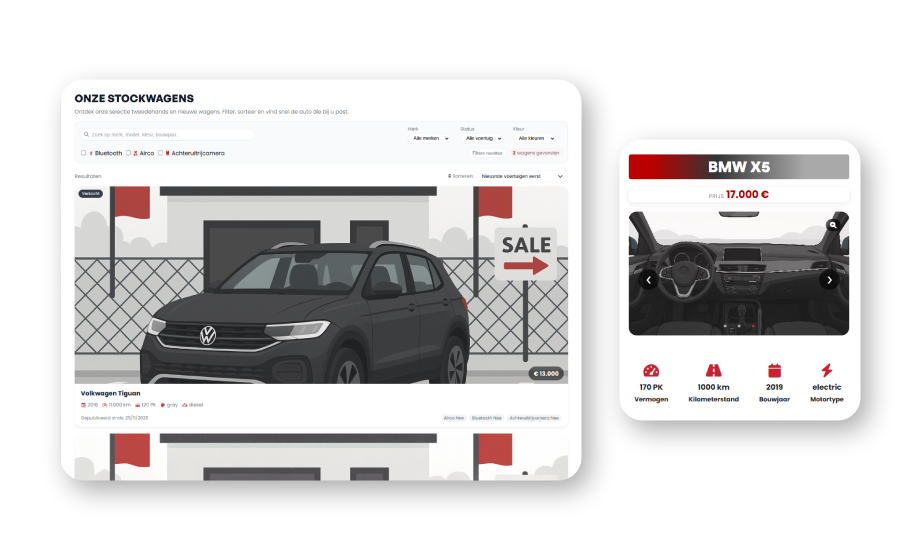
  • Car listing with cards, prices, mileage and year.
  • Opening hours table and Google Maps location, with optional WhatsApp button.
Admin panel
Backoffice to manage cars and content

Use the beheerderpaneel to change texts, images and data without touching code.

  • Manage cars: add, edit or hide vehicles with photos and details.
  • Edit homepage text, banners and number of cars shown on the site.
  • Configure logo, company info, VAT number, address and website colours from one screen.
Statistics & invoicing
Dashboard and built‑in invoicing module

Follow what happens on your site and create invoices in the same CMS.

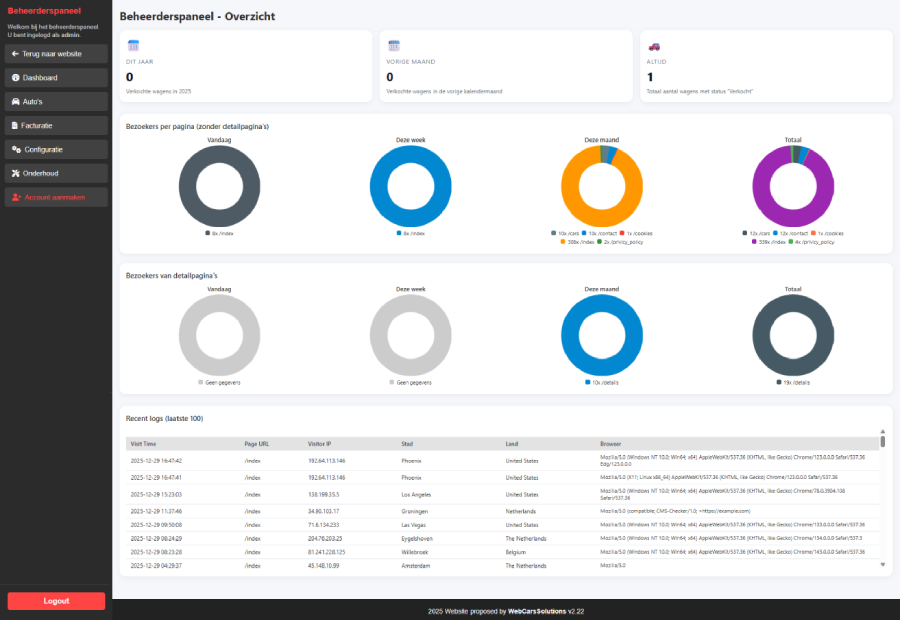
  • Overview page with visitors per page: today, this week, this month and total.
  • Detail statistics per car detail page and table with last visits (IP, city, country, browser).
  • Invoicing screen with income / costs / profit graph per month, invoice lines and customer management.

How the WebCarSolutions CMS works for your garage.

From the first setup to daily use, everything is managed from the same backoffice – no technical skills required.

1
1. We activate your WebCarSolutions CMS
We create your garage in the system, connect your domain and prepare the default website like the demo.
2
2. You configure your site from the admin panel
You log in to the beheerderpaneel to enter your company info, logo, opening hours, colours and homepage text.
3
3. You add cars and start invoicing
You add cars with photos, use the dashboard to see visitors and create invoices directly in WebCarSolutions.

Contact

Email pro.maxim.carli@gmail.com
Please mention your garage name, country (Belgium or France) and preferred language (EN / FR / NL).
Tell us about your garage, how you sell cars today and if you want a demo of the WebCarSolutions CMS. We will reply with the next steps.